How to Measure Your Yard for a Robot Mower (Size & Slope)
A step-by-step you can do in under 15 minutes with a phone, a free satellite map, and one wooden board.
So, you’re tired of spending your Saturday mornings wrestling with a gas-powered push mower and you’ve finally decided to let a robot take over. It’s a smart move, but before you start browsing the latest models from Mammotion or Husqvarna, there is one non-negotiable step: you have to know what you’re actually asking the machine to do. If you buy a mower rated for a quarter-acre and you actually have a half-acre of grass, the robot will spend its entire life charging and never actually finish the job.
The short answer is that you don't need a professional land survey. If you want to know how to measure yard for robot mower needs, you can do it in about 15 minutes using a free online map for the area and a simple DIY "pitch gauge" for your hills. Here is the step-by-step guide to getting the measurements that actually matter.
Step 1: Mapping the "Mowable" Area
The biggest mistake homeowners make is looking at their total property size—say, a 0.5-acre lot—and buying a mower for that size. But your house, driveway, patio, and mulch beds aren't made of grass. You only need to pay for the capacity you'll actually use.
The easiest way to do this is using a free tool like Google Maps (on a desktop) or specialized sites like "Measure My Lawn."
- Find your home on Google Maps and switch to Satellite View.
- Right-click on the edge of your lawn and select "Measure distance."
- Click around the perimeter of your actual grass areas, skipping the house and driveway.
- Close the loop, and a small box at the bottom of the screen will show you the "Total Area" in square feet.
Since most manufacturers like Segway or Worx list their capacities in acres, just divide your square footage by 43,560. If you have 10,000 square feet of grass, you have roughly 0.23 acres.
Pro Tip: Always round up. If your lawn is 0.23 acres, don't buy a mower rated for exactly 0.25 acres. Aim for a machine rated for at least 20% more than your actual needs to account for battery degradation over time and complex "travel time" between zones.
Step 2: Finding Your Steepest Slope
Most budget-friendly robot mowers can handle a 20-degree incline, while high-end AWD models like the Mammotion LUBA 2 are rated for 30 degrees or more. If you guess wrong here, your mower will spend half its life stuck at the bottom of a hill with a "tilt sensor" error.
You don't need a fancy clinometer. You just need a straight 3-foot board (like a 2x4), your smartphone, and a free level app.
- Place the board on the steepest part of your yard, running straight up and down the hill.
- Open your phone’s level app (usually built into the "Measure" app on iPhones or "Bubble Level" on Android).
- Lay the phone on the board and read the number.
Important: Note whether your phone is measuring in degrees or percent grade. This is where people get tripped up. A 20-degree slope is roughly a 36% grade. Most robot mower specs will list both, but make sure you aren't comparing apples to oranges. If your hill is over 20 degrees, you are officially in "premium mower" territory and will likely need an All-Wheel Drive (AWD) model.
Step 3: Accounting for Obstacles and "No-Go" Zones
When learning how to measure yard for robot mower installation, most people forget the islands. If you have a large garden bed in the middle of the lawn or a trampoline that stays in one spot, you need to decide if you’re going to "island" these off.
If you are looking at a "boundary wire" mower like an older Husqvarna Automower or a Worx Landroid, every obstacle you circle uses up wire. If you are looking at a "wire-free" GPS mower like the EcoFlow Blade or Segway Navimow, these obstacles just mean more "no-go zones" in the app.
Take a quick walk and count:
- Trees with exposed roots (mowers hate these).
- Flower beds without a hard plastic or stone border.
- Narrow passages (anything less than 4 feet wide).
If you have a narrow side-yard that connects the front and back, measure the width from the house to the fence. If it's less than 3 feet wide, many robots will struggle to navigate through it effectively.
Step 4: Check Your Signal (The "Sky View" Test)
This measurement isn't about feet or inches; it's about line-of-sight. If you are planning on buying a modern RTK-GPS mower (like the Anthbot Genie or Ecovacs Goat), the mower needs to "see" the sky to know where it is.
Stand in the middle of your yard and look up. If you are under a dense canopy of old-growth oak trees or if your yard is a narrow strip between two three-story buildings, a GPS mower might lose its signal. In these "urban canyons" or heavily wooded lots, you might actually be better off with a traditional wired mower or a vision-based system like the Eufy S1 Pro or the Ecovacs Goat G1, which use cameras instead of just satellites.
Why These Numbers Save You Money
Knowing your yard's specs allows you to shop the "sweet spot" of the market. Robot mowers generally fall into three price tiers:
- Small/Flat Lots: Entry-level models (under the entry-level tier) like the Worx Landroid S or smaller Segway models.
- Mid-Sized/Standard Lots: The "workhorse" tier (around the the mid-tier range mark) that handles about a half-acre.
- Large/Steep/Complex Lots: High-capacity AWD models (low-to-mid four figures) like the Mammotion LUBA or Husqvarna 435X AWD.
If you measure and realize your "half-acre" lot only has 8,000 square feet of actual grass and no hills over 15 degrees, you can save over the entry-level tier by buying a smaller, two-wheel-drive machine instead of a heavy-duty flagship model.
Bottom Line
Measuring for a robot mower is about finding the "mowable" square footage and identifies the steepest hill on your property. Use a satellite map for the area, a 3-foot board with a phone app for the slope, and always buy a mower with about 20% more capacity than your yard actually requires.
Buying Guide
Read now →Mowers mentioned
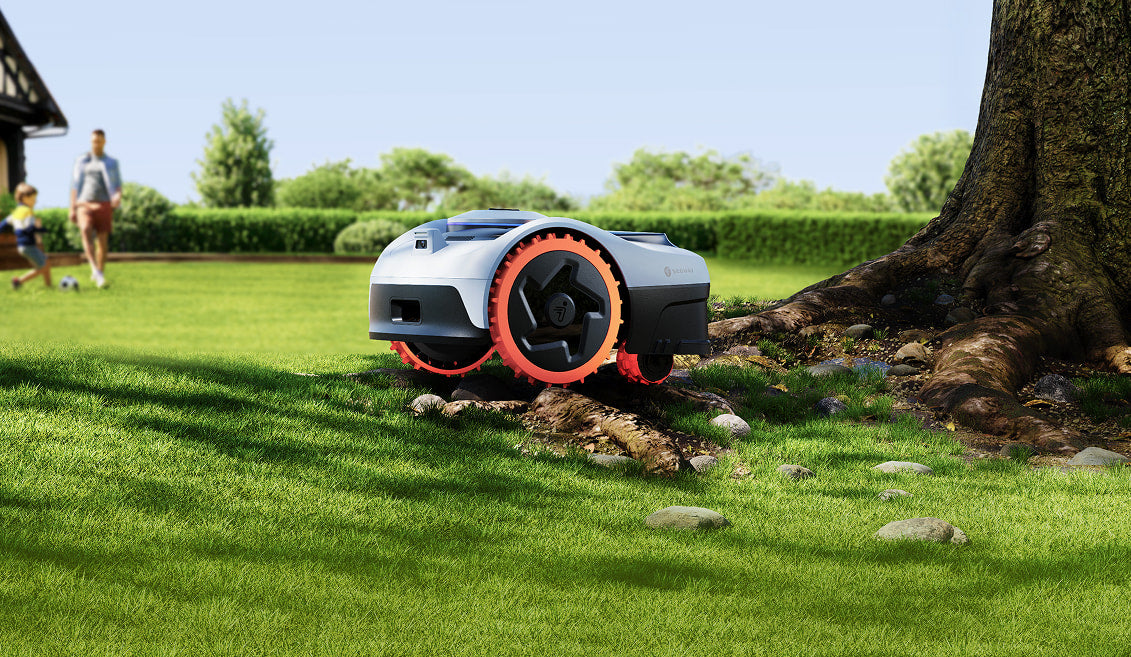
Navimow i108E
- Coverage
- ~0.2 acre (≈8,700 sq ft)
- Max slope
- ~24° (≈45%)
- AWD
- No
If your lawn is up to about an eighth of an acre and you want the simplest wire-free experience on the market, the i108E is hard to beat.
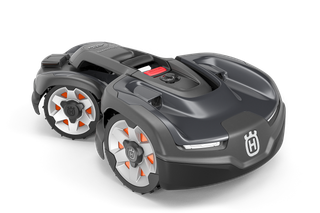
Husqvarna Automower 415X
- Coverage
- ~0.4 acre (≈17,000 sq ft)
- Max slope
- ~22° (≈40%)
- AWD
- No
Boring in the best way. Husqvarna's 415X has been polished over a decade of Automower releases — set it up once and it runs for years.
Related guides
- Robot Mower Setup Day: What the First Hour Really Looks Like
An honest walkthrough of unboxing a wire-free mower for the first time — what's easy, what's fiddly, what's not in the manual.
- See our full ranking of the best robot mowers →